
As the world of video creation evolves, two platforms stand out: Luma and InVideo. Each offers unique features that cater to different needs. The Luma AI focuses on producing cinematic video clips that emphasize photorealism and natural motion. This makes it ideal for high-end storytelling projects.
On the other hand, InVideo AI excels in transforming simple text prompts into complete multi-scene videos. This functionality is perfect for marketers and content creators who need to generate structured videos quickly. The choice between these two tools hinges on your specific requirements—whether you prefer realistic short clips or a comprehensive production suite.
In this article, we will delve into a detailed comparison of these platforms. Our analysis will highlight how they influence video creation and digital content strategies in 2026. Both tools represent the forefront of AI technology, catering to a wide range of users from professionals to hobbyists.
Introduction to the Comparison
In today’s fast-paced digital landscape, video content has become a cornerstone for creators. As we move into 2025, the demand for engaging videos is higher than ever. This shift makes understanding the tools available essential for anyone looking to create impactful content.
The rapid advancement of video generation technology has transformed how creators approach their projects. With AI tools, producing professional-grade videos is now possible without expensive equipment or extensive training.
Here are some key reasons why this comparison is vital for content creators:
- Video content has evolved from a luxury into a fundamental necessity for building a personal brand or launching a course.
- Understanding the differences between various tools can help optimize your production workflow.
- Selecting the right video tools can significantly impact your ability to reach target audiences in a competitive landscape.
- This guide will help you navigate the complex market of AI-driven software.
- By evaluating these platforms, you can find the best fit for your creative goals and technical needs.
| Feature | Luma AI | InVideo AI |
|---|---|---|
| Video Quality | Cinematic and photorealistic | Template-based with stock footage |
| User Experience | Intuitive interface for storytelling | Quick setup for fast production |
| Target Audience | Filmmakers and storytellers | Marketers and content creators |
Understanding the Core Features of Luma AI
Exploring the unique offerings of Luma reveals how it redefines video creation for professionals. This platform excels at generating photorealistic video clips, showcasing a strong grasp of physics and natural movement. Such features make it ideal for cinematic projects that demand high quality.
Users can input either text or an image to generate impressive video content that mimics professional DSLR camera work. The Dream Machine engine creates unique scenes that feel grounded in reality, making it perfect for product demos.
Additionally, Luma offers on-demand 3D asset creation. This allows users to adjust lighting and camera angles, providing more control over the final visual quality. The free plan grants 150 seconds of video per month, enabling creators to explore the platform’s capabilities without any financial commitment.
By focusing on prompt engineering, users can refine their outputs to achieve the specific cinematic look required for their creative content. Overall, Luma stands out as a powerful tool for those who prioritize visual realism and advanced 3D features in their short-form clips.
| Feature | Description |
|---|---|
| Video Quality | Photorealistic with natural movement |
| Clip Length | 5 to 10 seconds per clip |
| Free Plan | 150 seconds of video monthly |
| 3D Asset Creation | On-demand adjustments for lighting and angles |
| Input Options | Text or images for video generation |
Exploring InVideo AI’s Capabilities
Video creation has become more accessible, thanks to innovative tools that simplify the process. One such tool is InVideo, which provides a range of features tailored for both beginners and experienced creators.
This platform excels in template-based video creation, allowing users to utilize a vast library of over 5,000 customizable templates. These templates cater to various platforms, making it easy to create videos for social media, marketing, and more.
Template-Based Video Creation
With InVideo, users can quickly generate videos by selecting a template that fits their vision. The built-in editor supports drag-and-drop functionality, making it user-friendly for those new to video editing.
Stock Footage Library and Editing Tools
InVideo also boasts a massive stock footage library with over 9 million assets, including images and music tracks. Users can input text prompts to create multi-scene videos, which the platform populates with relevant stock footage and automated scripts.
Moreover, a free plan is available, allowing creators to explore the platform’s features before committing to paid plans. This makes it an excellent option for those looking to streamline their video production without needing extensive technical skills.

| Feature | Description |
|---|---|
| Templates | Over 5,000 customizable options |
| Stock Media | Access to 9 million assets |
| Editing Tools | User-friendly drag-and-drop editor |
| Text Prompts | Generate videos based on user input |
| Free Plan | Explore features before upgrading |
Detailed Analysis of Luma AI vs InVideo AI
When comparing video creation tools, it’s crucial to assess their core functionalities and target audiences. Each platform has its strengths that cater to different user needs.
A side-by-side comparison reveals that one tool focuses on cinematic video generation, while the other prioritizes structured marketing content. The cinematic clips are limited to 10 seconds, whereas the alternative can produce longer, multi-scene videos using its extensive stock footage library.
While one platform offers superior photorealism and 3D features, the other provides a more complete suite for script and voiceover production. Both platforms have a free plan that allows users to explore basic features, but paid plans are necessary to remove watermarks and access premium media.
Additionally, one tool requires more manual prompt engineering to achieve the desired quality, while the other uses templates to speed up the process. Understanding these core differences helps creators choose the right tool for their specific video content and editing requirements.
Ease of Use and Editing Experience
Creating engaging videos can be a smooth process with the right tools. The ease of use and editing experience can significantly influence your productivity and creativity. Both platforms offer unique approaches to help users craft their video content effectively.
User Interface and Learning Curve
InVideo AI features a user-friendly interface that allows beginners to create videos quickly. With drag-and-drop tools and simple text commands, users can start producing content almost immediately.
On the other hand, Luma AI presents a steeper learning curve. It requires users to master prompt engineering to generate high-quality, realistic video clips. This can be challenging for those new to video creation.
The editing experience in InVideo is centered around a timeline, making it ideal for managing multiple scenes. In contrast, Luma AI focuses on refining the initial prompt rather than traditional timeline manipulation.
Both platforms provide a free plan, allowing new users to get comfortable with the interface before committing to a paid subscription. As a video maker, InVideo is generally considered more accessible for those needing to produce content quickly.
Mastering the unique features of each platform will significantly improve your efficiency when you create videos for your brand.
Pricing, Free Plans, and Value for Money
Navigating the pricing landscape of video creation tools is essential for any content creator. Understanding the costs can help you make informed decisions that fit your budget.
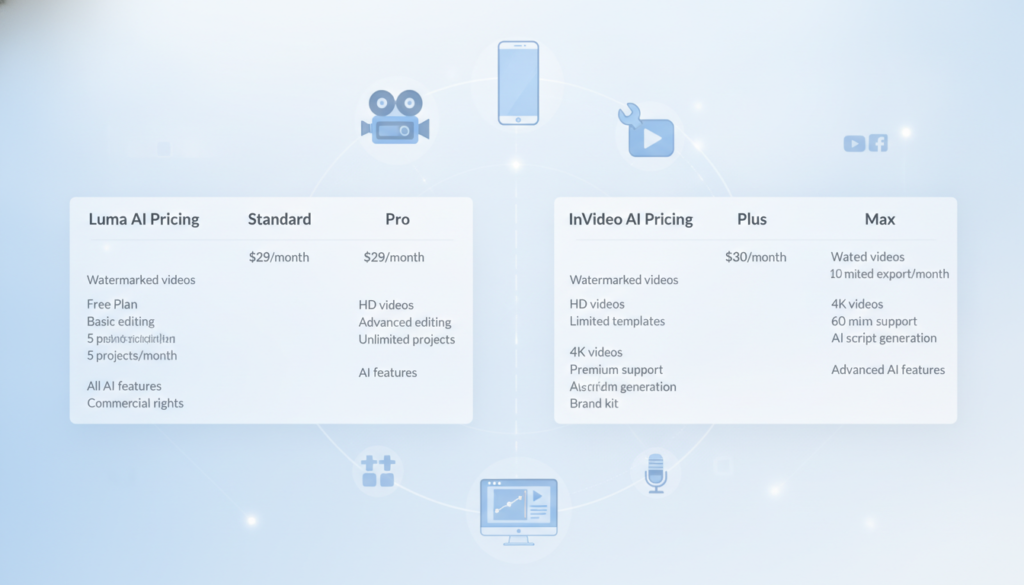
Here’s a breakdown of the pricing for both platforms:
- Luma AI offers a competitive entry point with paid plans starting at $7.99 per month. This makes it an affordable way to generate realistic clips.
- InVideo is priced higher, with paid plans starting at $28 per month. However, it includes a massive library of stock media and music.
- Both platforms provide a free plan, but these versions often include watermarks and limited access to advanced features or high-quality exports.
- When evaluating value, consider that Luma AI is cheaper per clip, while InVideo AI provides more tools for a complete video maker workflow.
- Advanced users may find that the higher-tier paid plans for InVideo AI offer better support for team collaboration and complex content needs.
- Luma AI’s pricing model is ideal for solo creators who need high-quality, physics-aware video generation without the overhead of a full studio.
Ultimately, the best value depends on whether your project needs the cinematic quality of Luma or the template-driven efficiency of InVideo.
Industry Applications and Use Cases
The rise of video content has opened new avenues for marketers and creators alike, making it vital to explore its diverse applications. Video is not just a medium; it has become a key player in marketing, social media, and creative projects.
In the realm of social media, platforms like TikTok thrive on engaging video content. With 74% of videos viewed without sound, tools that add subtitles and visual elements are essential. This is where specific video tools shine.
For instance, InVideo is particularly effective for social media marketing. Its extensive template library ensures that marketing teams can maintain consistency across campaigns. Here are some highlights:
- Optimized for platforms like TikTok, allowing for quick content creation.
- Tools to add subtitles enhance engagement, crucial since many viewers watch without sound.
- Both platforms offer a free plan to test their suitability before committing to paid plans.
On the other hand, Luma excels in creative projects that require photorealism. It is perfect for cinematic product shots and concept art. This capability captures attention in competitive advertising spaces.
By leveraging these platforms, creators can produce a high volume of professional videos that resonate with their target audience effectively.
Additional Considerations and Unique Features
In the evolving landscape of video production, creators must consider unique features that enhance their projects. Tools like InVideo offer functionalities that streamline the video creation process.
For instance, InVideo AI stands out by providing AI-generated scripts and voiceovers. This feature significantly reduces the time needed to create videos for marketing. By automating these elements, users can focus more on the creative aspects of their projects.
While one platform focuses on stunning visuals, tools like BIGVU offer a teleprompter and script generator. This helps creators maintain eye contact while recording, enhancing the final output’s quality.
Consistency is key in branding, and InVideo helps maintain this by allowing users to apply templates across all their video content. This feature ensures that every video aligns with the brand’s identity.
For creators needing more than just visuals, integrating a script assistant or voiceover tool can elevate the overall quality of the final product. Unlike InVideo, Luma lacks built-in script or voiceover features, requiring users to rely on external tools.
The ability to use text prompts to generate both the script and the visual scene makes InVideo a powerful all-in-one solution. By choosing the right combination of features, you can ensure your video projects meet the professional standards required for your specific industry needs.
Conclusion
In the realm of digital storytelling, the choice of video tools can significantly shape your creative journey. Luma is ideal for those who prioritize photorealistic video clips and cinematic quality. This makes it perfect for unique creative projects that demand high standards.
On the other hand, InVideo shines for marketing teams and social media managers needing to create video content at scale. Its extensive template library simplifies the process, allowing for quick and efficient video production.
Both platforms offer a free plan, giving users the chance to explore their capabilities before committing to the paid plans that unlock full features. Your decision should hinge on whether you need the realism of one tool or the all-in-one editing suite of the other.
By understanding the strengths of each video maker, you can streamline your production process and enhance your digital presence. Ultimately, both tools represent the future of video generation, providing powerful ways to bring your creative vision to life in 2026.